> ## Documentation Index
> Fetch the complete documentation index at: https://docs.fungies.io/llms.txt
> Use this file to discover all available pages before exploring further.
# Test Webhooks
> Test your webhook integration locally before deploying to production.
Before deploying your webhook handler to production, you'll want to verify it works correctly. This guide covers two approaches: using webhook.site for quick testing, and ngrok for testing your actual code.
## Option 1: Quick Test with webhook.site
[webhook.site](https://webhook.site/) is a free tool that gives you a temporary URL to receive and inspect webhook payloads. It's perfect for understanding the event structure before writing any code.
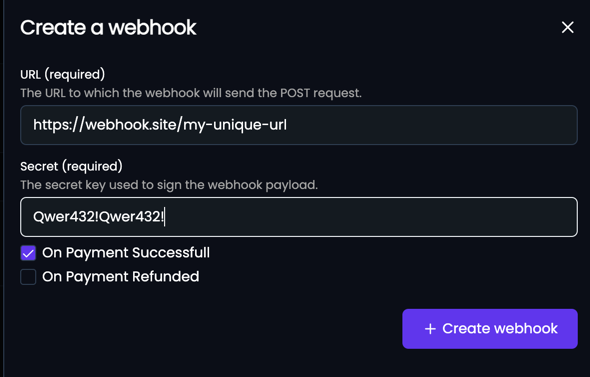
Go to [webhook.site](https://webhook.site/) and copy your unique URL
Navigate to [Fungies Dashboard](https://app.fungies.io) → **Developers** → **Webhooks** → **Create a webhook**
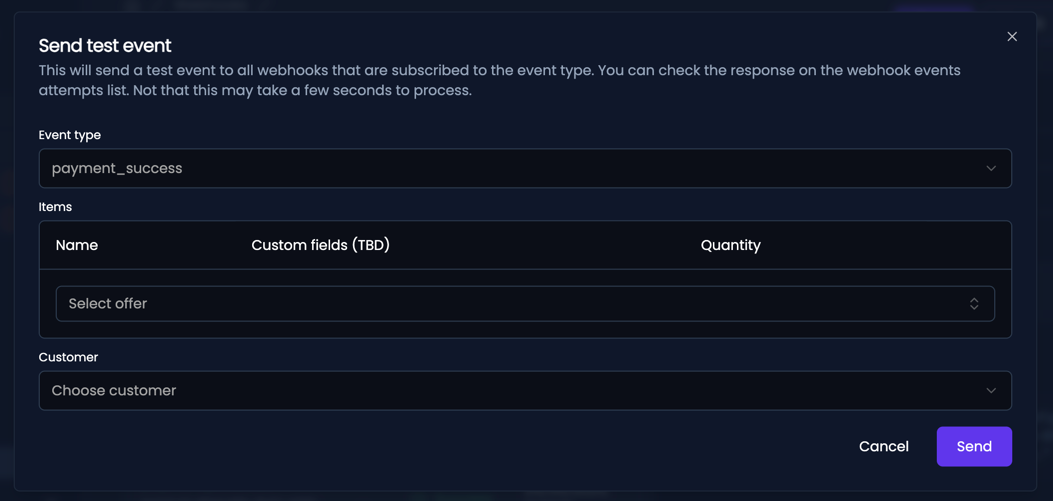
 Open your webhook and click the **Test** button. Select an event type and click **Send**.
 Check webhook.site to see the full event payload and headers.
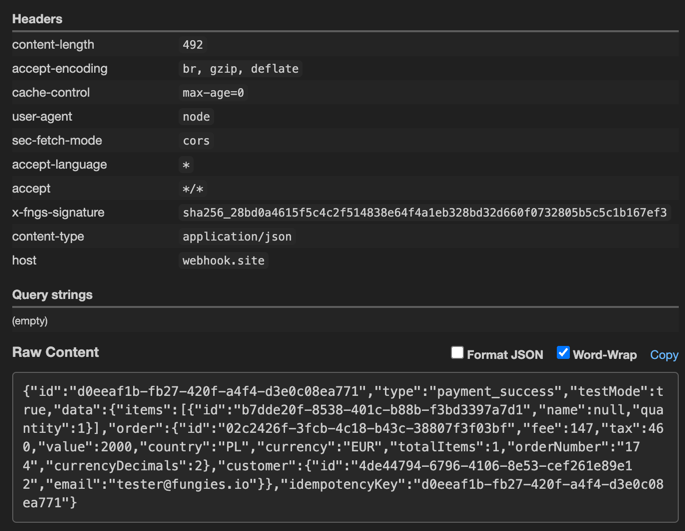 Test events include `"testMode": true` in the payload and don't affect any real data in your account.
## Option 2: Test Your Code with ngrok
[ngrok](https://ngrok.com) creates a secure tunnel from the internet to your local machine. This lets you test your actual webhook handler code with real Fungies events.
### Install ngrok
```bash theme={null}
# macOS (Homebrew)
brew install ngrok
# Or download from https://ngrok.com/download
```
### Start the Tunnel
Run your local server, then create a tunnel to it:
```bash theme={null}
# Start your local server (example: running on port 3000)
npm run dev
# In another terminal, create the tunnel
ngrok http 3000
```
You'll see output like this:
```bash theme={null}
Session Status online
Forwarding https://abc123.ngrok.io -> localhost:3000
```
### Register Your Tunnel URL
1. Copy the `https://...ngrok.io` URL
2. Go to [Fungies Dashboard](https://app.fungies.io) → **Developers** → **Webhooks**
3. Create a webhook with your ngrok URL + your endpoint path (e.g., `https://abc123.ngrok.io/webhooks/fungies`)
### Send Test Events
Use the **Test** button in the Dashboard to send events to your local server. Check your terminal logs to see the events being received and processed.
ngrok provides a local web interface at `http://localhost:4040` where you can inspect all requests and replay them for debugging.
## Testing Best Practices
### Use a Separate Webhook for Testing
Create a dedicated webhook endpoint for development to avoid mixing test events with production data.
### Verify Your Error Handling
Test how your handler responds to:
* Invalid payloads
* Missing required fields
* Duplicate events (same event ID sent twice)
* Network timeouts
### Log Everything During Development
```javascript theme={null}
app.post('/webhooks/fungies', (req, res) => {
console.log('Received webhook:', {
headers: req.headers,
body: JSON.stringify(req.body, null, 2)
});
// ... your handler logic
res.status(200).send('OK');
});
```
## Checklist Before Going Live
Endpoint returns `2xx` within 30 seconds
Signature verification is implemented and working
Handler is idempotent (handles duplicate events)
Errors are logged for debugging
Endpoint uses HTTPS
## Next Steps
Review webhook concepts and delivery guarantees
See all available event types and their payloads
Test events include `"testMode": true` in the payload and don't affect any real data in your account.
## Option 2: Test Your Code with ngrok
[ngrok](https://ngrok.com) creates a secure tunnel from the internet to your local machine. This lets you test your actual webhook handler code with real Fungies events.
### Install ngrok
```bash theme={null}
# macOS (Homebrew)
brew install ngrok
# Or download from https://ngrok.com/download
```
### Start the Tunnel
Run your local server, then create a tunnel to it:
```bash theme={null}
# Start your local server (example: running on port 3000)
npm run dev
# In another terminal, create the tunnel
ngrok http 3000
```
You'll see output like this:
```bash theme={null}
Session Status online
Forwarding https://abc123.ngrok.io -> localhost:3000
```
### Register Your Tunnel URL
1. Copy the `https://...ngrok.io` URL
2. Go to [Fungies Dashboard](https://app.fungies.io) → **Developers** → **Webhooks**
3. Create a webhook with your ngrok URL + your endpoint path (e.g., `https://abc123.ngrok.io/webhooks/fungies`)
### Send Test Events
Use the **Test** button in the Dashboard to send events to your local server. Check your terminal logs to see the events being received and processed.
ngrok provides a local web interface at `http://localhost:4040` where you can inspect all requests and replay them for debugging.
## Testing Best Practices
### Use a Separate Webhook for Testing
Create a dedicated webhook endpoint for development to avoid mixing test events with production data.
### Verify Your Error Handling
Test how your handler responds to:
* Invalid payloads
* Missing required fields
* Duplicate events (same event ID sent twice)
* Network timeouts
### Log Everything During Development
```javascript theme={null}
app.post('/webhooks/fungies', (req, res) => {
console.log('Received webhook:', {
headers: req.headers,
body: JSON.stringify(req.body, null, 2)
});
// ... your handler logic
res.status(200).send('OK');
});
```
## Checklist Before Going Live
Endpoint returns `2xx` within 30 seconds
Signature verification is implemented and working
Handler is idempotent (handles duplicate events)
Errors are logged for debugging
Endpoint uses HTTPS
## Next Steps
Review webhook concepts and delivery guarantees
See all available event types and their payloads